This project began as an exam assignment for my bachelor’s but
evolved into a full-fledged undertaking: implementing a PDF generator
from scratch that produces files from a predefined custom JSON document
format. Before I knew about tools like Pandoc, it was instructive to
read the PDF specification and implement it directly. The main challenge
is that PDF is a binary format requiring precise encoding of every
detail, font metrics, glyph mappings, character positioning, and page
structure, so readers can decode it. The format is deceptively complex,
with interacting layers such as object references, stream encoding, and
resource dictionaries that must align perfectly for valid files.
Rust was ideal for this project because its strong type system
catches many errors at compile time, and the ecosystem provides
excellent libraries for the low-level operations required. The
implementation relies on three core dependencies: lopdf for
low-level PDF object manipulation and document structure,
owned_ttf_parser for parsing TrueType font files and
extracting glyph metrics, and serde with
serde_json for deserializing the JSON document format into
strongly-typed Rust structs. Additional libraries like
nalgebra-glm handle matrix transformations for image
positioning, though image support remains partially implemented.
My goal was not only to generate PDFs but to produce deterministic,
byte-for-byte identical documents for reliable testing, which requires
controlling generation parameters via low-level APIs and converting to
PostScript. The code is fully publicly available, thoroughly documented,
and published on GitHub and crates.io at these links. This
project has had a total of 9,000 downloads.
The library provides both a command-line interface for generating
PDFs and a high-level API, which was used specifically to create the
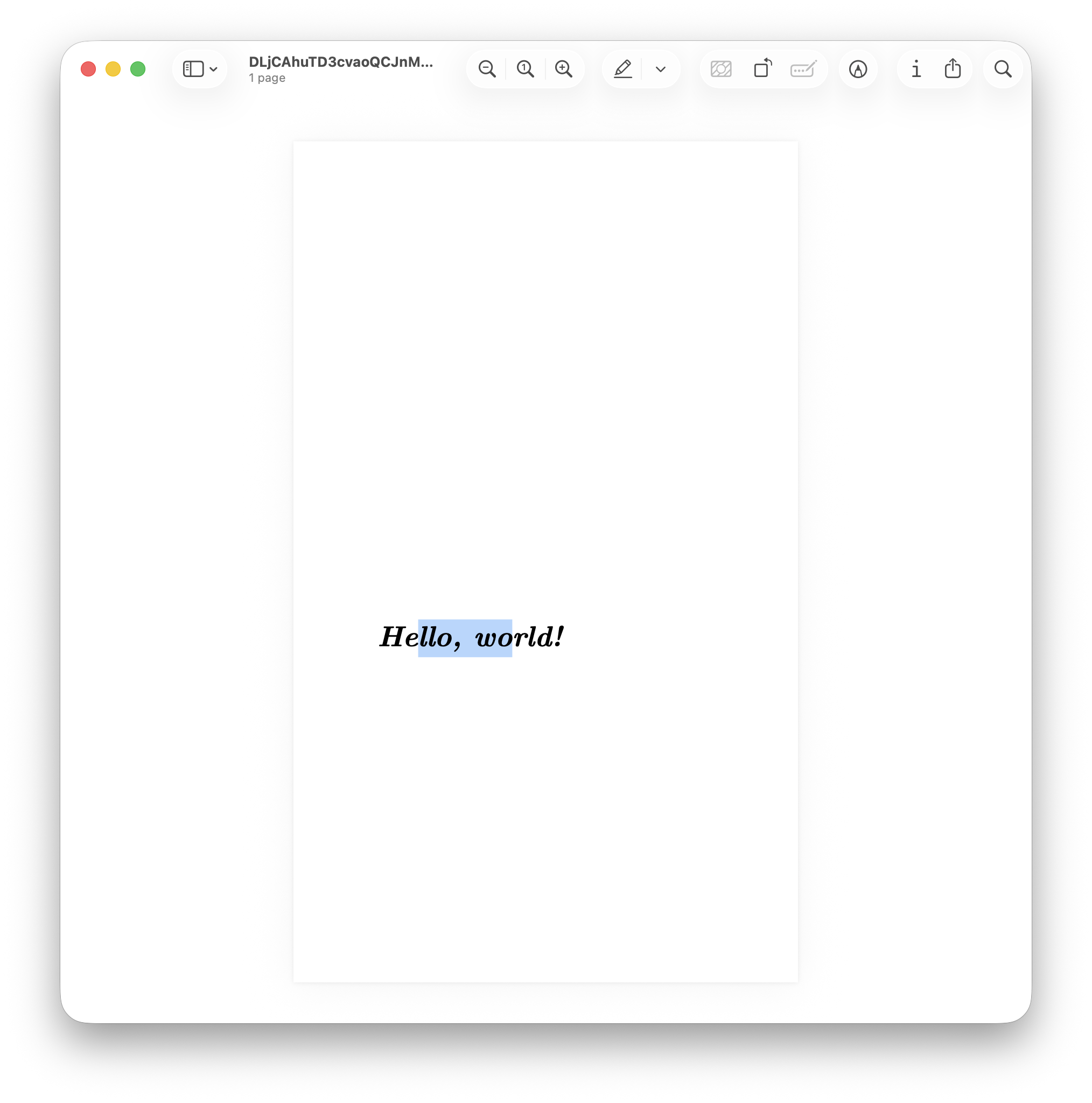
following example. The resulting PDF is available at the following link.
As you can see in the following screenshot, the text can be correctly
highlighted using a standard PDF reader, demonstrating the validity of
the output.
Implementation
This challenge quickly became extremely complex. The text files must
be loaded and embedded within the PDF starting from the original TTF
font file, with a complete character-to-glyph mapping and proper Unicode
support. Text positioning must be specified in millimeters and converted
to PDF points, and pages must be created with customizable dimensions.
All of this must be driven through a high-level interface, a JSON file
that is deserialized at runtime to produce the input for PDF
generation.
The architecture is divided into two layers: the high-level
Document struct that represents the JSON format, and the
low-level PdfDocument struct that interfaces directly with
lopdf. The Document provides a
to_pdf() method that automatically loads fonts from the
Computer Modern Unicode (CMU) family, the same fonts used in LaTeX, and
converts each operation in the JSON into corresponding PDF operations.
This separation allows users to either work with the simple JSON format
or bypass it entirely and use the PdfDocument API for
fine-grained control over PDF generation.
The high-level JSON interface defines the sequence of operations
required to generate a PDF. It initializes the page with the specified
width and height in millimeters, then executes text operations within
that page. Text is placed by specifying its RGB color, the position in
millimeters measured from the bottom-left corner, the content to be
written, the font size, and the font index to use. Fonts are currently
loaded by default by the program because external font loading is not
yet fully implemented; available choices include typewriter, sans-serif,
bold, standard, and Roman from the Latin Modern family used in LaTeX
documents. Additionally, the document ID and the instance ID must be
specified. These two parameters are required to uniquely identify a
document and to enable reproducible billing. They can be provided
manually by the user. The font loading order is determined by sorting
the paths so the font indices remain consistent across runs.
{
  "documentId": "QU2KK7yivMeRDnU8DodEQxnfqJAe4wZ2",
  "instanceId": "DLjCAhuTD3cvaoQCJnMvkC0iNWEGEfyD",
  "operations": [
    {
      "pageWidth": 210.0,
      "pageHeight": 297.0
    },
    {
      "color": [0.0, 0.0, 0.0],
      "position": [50.0, 200.0],
      "textString": "Hello, world!",
      "fontSize": 48.0,
      "fontIndex": 0
    }
  ]
}
I’m betting that TrueType fonts in PDFs are complicated because the
PDF specification predates Unicode. PDFs use character IDs (CIDs) and
CID fonts, which map 16-bit glyph IDs to Unicode code points via a CMAP
(character map). The process involves parsing the TTF file to extract
the ascent and descent in font units per em, extracting glyph-to-Unicode
mappings from the font’s CMAP table, calculating glyph widths for proper
text spacing, and generating a CID-to-Unicode CMAP for text
extraction.
Font parsing begins by loading the TTF file bytes and constructing an
OwnedFace using the owned_ttf_parser library.
This face provides access to the font’s internal tables, including the
CMAP table that maps Unicode codepoints to glyph indices. The
implementation iterates through all Unicode-compatible subtables in the
CMAP, filtering for entries with positive glyph indices and building a
HashMap<u16, char> that associates each glyph ID with
its corresponding Unicode character. This mapping is essential for text
extraction and search functionality in PDF readers.
The glyph metrics determine character widths for spacing and the
horizontal advance, the distance to move the cursor before drawing the
glyph. For each glyph, the implementation queries the font face for its
horizontal advance width and bounding box. The height is calculated by
subtracting the font’s descender from the glyph’s vertical extent,
ensuring consistent baseline alignment. The horizontal advance is scaled
from font units to a default 1000-unit square using a normalization
formula, which places all fonts in the same coordinate space and
simplifies PDF layout calculations:
After loading the fonts and preparing the groundwork, the next step
is to write to a given PDF layer by constructing a sequence of PDF
operators, drawing commands that the renderer executes; this also
requires understanding that PDF points relate to millimeters by a
specific conversion:
This factor derives from the definition of points in relation to
inches.
PDF Layer System and
Low-Level Operations
The PDF generation process centers around lopdf, a Rust
library that provides low-level access to PDF object structure. Unlike
higher-level libraries that abstract away PDF internals,
lopdf requires explicit construction of PDF objects,
dictionaries, and streams. Each page in the document contains one or
more layers (content streams) that hold sequences of PDF operations such
as Tm (set text matrix), Tf (set font), and
Tj (show text). The PdfLayer struct wraps a
vector of these operations, which are later encoded into a compressed or
uncompressed stream depending on configuration.
Text rendering requires setting the text state before each string of
characters. This involves calculating the text matrix that positions
text at the specified coordinates, selecting the font and size via the
font resource dictionary, and setting the RGB color using the
rg operator. The implementation normalizes all text to
Unicode NFC (Canonical Decomposition followed by Canonical Composition)
before rendering to ensure consistent glyph selection across different
input sources. Each text operation is appended to the current layer’s
operation vector, and when the page is finalized, these operations are
encoded into the page’s content stream.
To generate a document from scratch using this library, use the
following high-level API (as per the example):
// Create a new document with a predefined document ID
let document_id = "QU2KK7yivMeRDnU8DodEQxnfqJAe4wZ2".to_string();
let mut pdf_document = PdfDocument::new(document_id);
// Add a page of 300 by 500 millimeters with an empty layer
let (page_index, layer_index_in_page) = pdf_document.add_page_with_layer(300.0, 500.0);

// Add a font to the document, in this case it is the bold italic font of the CMU family
let font_path = Path::new("fonts/computer-modern/cmunbi.ttf");
let font_index = pdf_document.add_font(font_path).unwrap();

// Write some text to the current page at the current layer
pdf_document
    .write_text_to_layer_in_page(
        page_index,
        layer_index_in_page,
        [0.0, 0.0, 0.0],
        "Hello, world!".into(),
        font_index,
        48.0,
        [50.0, 200.0],
    )
    .unwrap();

// Because we are not working with a `Document`, but instead with a `PdfDocument` we need
// to first save the PDF document to bytes and then to a file
let instance_id = "DLjCAhuTD3cvaoQCJnMvkC0iNWEGEfyD".to_string();
pdf_document.optimize();
pdf_document.write_all(instance_id.clone()).unwrap();
let pdf_document_bytes = pdf_document.save_to_bytes().unwrap();
Deterministic Output for
Testing
The library focuses on producing byte-identical PDFs every time to
enable regression testing by comparing PDFs after code changes.
Traditional PDF libraries use random UUIDs for document IDs and
timestamps in metadata, which makes output non-deterministic. To achieve
determinism, the implementation requires users to provide both a
document_id and an instance_id as input
parameters. These identifiers replace the random UUIDs typically used in
PDF metadata, ensuring that identical inputs always produce identical
outputs.
Beyond explicit identifiers, achieving true determinism required
eliminating subtle sources of randomness throughout the codebase. One
major source was iteration order over HashMap collections,
which is non-deterministic in Rust. Switching to BTreeMap
for font resources and object dictionaries ensures consistent ordering
based on keys. Another source was the time crate’s
timestamp generation, which had to be controlled by accepting creation
dates as parameters rather than querying the system clock. Even the
order of font loading matters: the implementation sorts font file paths
before loading to ensure font indices remain consistent across runs.
The testing methodology generates fuzz targets, random JSON
documents, converts them to PDFs as reference outputs, converts those
PDFs to PostScript for easier text-based diffing using Ghostscript, and
then reconverts after code changes to verify diffs against the
references. Binary PDF diffs show raw byte changes without context,
whereas PostScript diffs are human-readable and reveal structural
changes. The conversion to PostScript uses the command
gs -sDEVICE=ps2write -o output.ps input.pdf, which produces
a text representation of the PDF’s drawing operations.
The PDFs my library generates are functional but unoptimized: they
contain redundant objects and uncompressed streams, making files large,
usually a few megabytes even for simple documents because all font files
are embedded in their entirety. The optimize() method
compresses streams and removes duplicate objects, typically reducing
file sizes by 80–90%. This optimization maintains determinism because it
applies transformations in a fixed order based on sorted object IDs.
The test outputs have not been included in the repository because
they are quite large, about half a gigabyte, due to redundant PDFs and
PostScript files that are not optimized by Ghostscript for verification
reasons. Each test generates both a PDF and its PostScript equivalent,
and with hundreds of fuzz targets, the storage requirements become
prohibitive for version control.